 NeuronCx
Multi-User, Multi-Cart CRM for Hub and Spoke Operations
A B2C CRM for businesses that serve thousands of customers in short cycles and seasonal peaks. Each customer has one record, each transaction holds the people and carts involved, and every lead goes to a virtual agent or your team by rules you set.
Multi-cart transactions: every booking, add-on and renewal on one transaction
Each booking, add-on or renewal is its own cart, with its own status, the person it is for, its own order and its own payment. One transaction holds all of them, so the second booking and next year's renewal land on the record they belong to. Sales CRMs open a new opportunity row each time, and the history sits somewhere a person has to go looking for it.
Multi-user transactions: several people, each with a role
The person a transaction was created for stays primary. Others are added by phone number or external ID, or without a phone number, each with a role. Relationships are stored between people, so they carry across every transaction both share.
Roles on a transaction
The primary person booked it and stays the main contact. Others join as payer, caregiver or guardian, and a dependent can be added without a phone number.
Several carts on one transaction
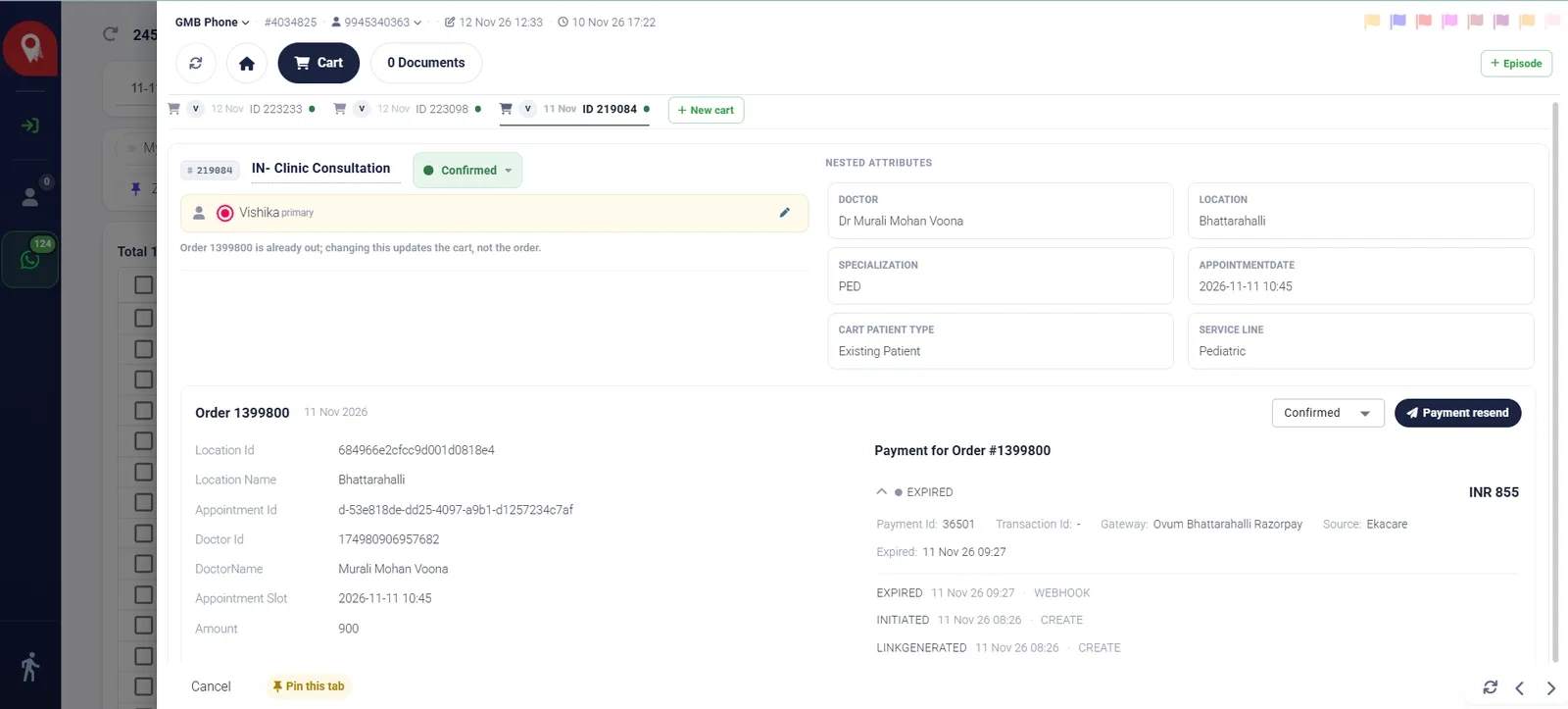
Each booking or add-on is its own cart, with its own date, ID, status and the person it is for. A new cart adds to the same transaction instead of starting a new record.
Order and payment history per cart
Each cart opens to its own order and payment history: link generated, paid or expired, and whether the update came from your team or the payment gateway.
Manage people
Add people to the transaction, set each person’s role and relationship to the primary, and see who each cart is for. Every change is logged.
Lifecycle rules for creating, progressing and closing transactions
Rules you set decide which leads become transactions, how they move forward and when they close. Agents record who they reached; events move the progress on their own.
Creation rules
Allow or block incoming leads by source, owner, external stage or event type, so duplicates and leads you don't serve never reach the list. A block rule always wins over an allow rule.
Contact stage
Stage records who your team reached and how: unattended, contacted, standby, cold or lost. Agents set it after each attempt, and it never changes how far the customer has progressed.
Progress phase
Phase moves on its own as events happen on the record, and every change is logged. It is reported the same way across every branch.
CRM automation and nurturing policies
Events on the record start follow-up actions, triggered by inactivity, an event or a milestone, such as a reminder after two days without a reply. Each action is recorded on the transaction it belongs to.
Archival rules
Close transactions automatically: junk at once, cold after the number of days you choose, and on order completion. Supervisors can restore a closed transaction at any time.
Episode rules
A transaction belongs to at most one episode, and follow-ups attach to the open episode on their own. An episode only opens when a rule names its type, and every decision is logged.
Human and virtual agents
Lead allocation, attribution and telephony integration
With virtual agents in the pool, allocation is a choice between a virtual agent and your team for each source. NeuronCx records who handled every call or message, gives each transaction its owners and each episode one coordinator, and applies rule changes as soon as they are saved.
Allocation sets by source, service or branch
The primary owner is set by where the lead came from. Secondary owners are added from details on the lead, such as service or branch, taking turns within each pool and never added twice.
- Primary owner by source: WhatsApp, website, web ads, social, partners
- Secondary owners by service or branch, in turn within each pool
- Rule changes apply as soon as they are saved, with no deploy
Virtual agents and your team in one pool
Booking, rescheduling and payment requests go to a virtual agent first, and move to a person on your team, with the full history, when the virtual agent cannot finish.
- WhatsApp and web forms: a virtual agent works next to your team
- Partner and referral leads: a named owner, plus a WhatsApp invite to book and pay
- Each agent's rules visible in one place: allocated, attributed and filtered
Presence-based routing and fallback agents
Digital leads go only to agents who are online and on the lead queue. If nobody is available, a designated fallback agent, human or virtual, takes the lead until someone picks it up.
- Online, on break and offline counts for the whole team
- Branch and specialist agents come from pools your supervisors set
- Agents pick a WhatsApp number and a phone station when going online
Telephony attribution and sticky agents
Your phone system decides who answers, and NeuronCx matches its agent ID to the right person. Call centre teams get every call recorded on the customer’s timeline, without changing the transaction’s owner.
- Works with PBX and cloud telephony systems
- Returning callers can be routed to their existing agent
- Calls with no agent logged in are recorded as unattributed for follow-up
Ownership at three levels, with self-allot and re-allocation
Attribution records who handled each call or message, allocation gives the transaction its owners, and each episode has one coordinator chosen in turn from its location's queue.
- Agents take a waiting lead with one click
- Supervisors re-allocate selected leads or a whole agent's list
- Every assignment recorded on the transaction and in the allocation log
B2C CRM for hub and spoke operations
A multi-location CRM for a central call centre and its branches: both work the same transaction, with visibility and reports set by your organisation's structure.
The central team takes every enquiry
The central team takes the call and stays the primary owner. Once the location is captured, a branch agent is added in turn and the request is flagged for the branch.
Managers see their own branch
Branch managers see their own agents and leads. A specialist manager can cover several branches, and one agent can report to more than one manager.
Visibility follows your structure
Chain, line of business, cluster and branch drive who sees what, and how reports are grouped, so a cluster supervisor works only their own cluster.
The branch closes the loop
When the branch acts on a request, it clears the flag and the central team sees the change on the transaction straight away.
Branch numbers reach branch teams
Phone trunks and stations map to branches, so a call to a branch number lands with that branch's team and on the right transaction.
Customers who move between branches
A customer who continues at another branch stays on the same episode. Each location has its own coordinator queue, separate from its branch agents.
Reports
Reports and dashboards for every transaction, cart and branch
CRM analytics built on the same record: lead volumes by source, how many transactions reach each phase, carts and payments by status, and each agent's and branch's workload, filtered by date, source or branch. Every count traces back to the transactions behind it.
Transaction trends by phase, stage, source and agent
See how many transactions arrived, how far they progressed and who owns them, broken down by phase, stage, source, branch or agent, and compared with any earlier period.

Cart and order conversion
Carts created and converted to paid orders, and acquisition, which counts each customer once at their first order. Group by agent, branch, line of business or location.

Source attribution from first touch to paid order
UTM, referral and promo-code tracking on every lead, carried through to the cart and order, so you can see which sources bring customers who actually book and pay.

Report builder, saved reports and scheduled exports
Filter and break down by any lead field, compare periods, set thresholds, save reports to My reports and schedule exports to arrive on the days you choose.

Drilldowns by line of business, cluster, branch and agent
Reports follow your organisation, so a cluster supervisor sees their own cluster and the central team sees every branch side by side.
Frequently asked questions
What is an agentic CRM?
An agentic CRM lets virtual agents do work on the record, not just store it. In NeuronCx, virtual agents sit in the same allocation pool as your team. They answer, build carts, send payment links and follow up, and hand over to a person with the full history when they cannot finish.
What is a B2C CRM?
A B2C CRM manages relationships with individual customers rather than companies. Instead of a pipeline of deals, it tracks people, the bookings and purchases they make, who pays and who else is involved, and every message and call across channels. NeuronCx keeps all of this on transactions grouped into customer episodes, so repeat bookings and renewals stay on one record.
How is this different from a CRM built on leads and deals?
A deal-based CRM opens a new opportunity for every sale, so a repeat customer starts again as a stranger. NeuronCx keeps one record per customer and puts each booking, add-on and renewal in its own cart on a transaction, so the history is already there when the customer comes back.
Can one transaction hold several people and several carts?
Yes. The person the transaction was created for stays primary, and others are added as payer, caregiver or guardian, or as a dependent without a phone number. Each cart records who it is for and has its own order and payment history.
How does NeuronCx decide between a virtual agent and a person?
Each lead source has its own rule. Requests a virtual agent can finish, such as booking, rescheduling or paying, go to it first. When it cannot finish, the lead moves to an online team member with the full history, or to a designated fallback agent if nobody is online.
How does it work with our phone system?
Your PBX or cloud telephony decides who answers a call. NeuronCx matches the phone system's agent ID to the right person and records the call on the customer timeline, without changing who owns the transaction. Returning callers can be routed to their existing agent.
Does it support a central call centre working with branches?
Yes. The central team takes the enquiry and stays the primary owner. Once the branch is known, a branch agent is added in turn from that branch's pool, and the request is flagged for the branch to act on. Managers see their own branch, and the central team sees all of them.
What does CRM automation do in NeuronCx?
CRM automation runs the rules you set on each transaction: which leads become transactions, who owns them, how the phase moves as events happen, which follow-ups go out after inactivity or a milestone, and when a transaction is closed. Every action is logged on the transaction it belongs to.
What is a customer episode?
A customer episode groups the transactions that serve one purpose over weeks or months, such as a course of service, a stay or a programme. Each episode has one coordinator, follow-ups attach to it on their own, and a transaction belongs to at most one episode.
Which reports come with the CRM?
Transaction trends by phase, stage, source and agent, cart and order conversion, source attribution from first touch to paid order, and drilldowns by cluster, branch and agent. Reports can be saved and exported on a schedule.