 NeuronCx
Inside the agentic CRM
One agentic CRM, from the first message to the closed episode
Most CRMs record what happened. NeuronCx runs the work. Channels, workflows and AI agents all read from one shared model of your business, so your team and your microbots act on the same context and the customer never has to repeat themselves.
Omnichannel CX
Omnichannel CX that keeps one thread across every channel
Cognitive workflows
CRM workflow automation that finishes the job, not just the first step
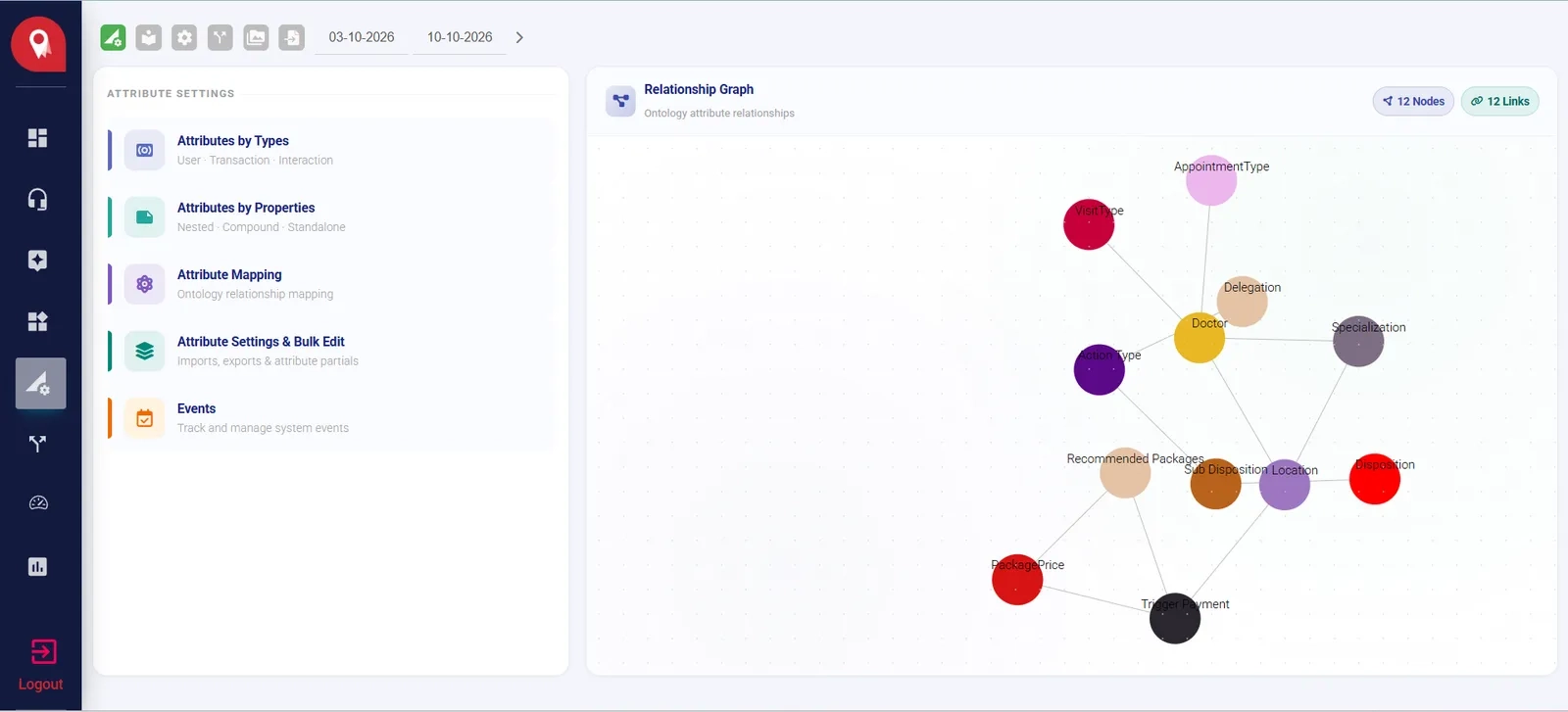
Ontology and context
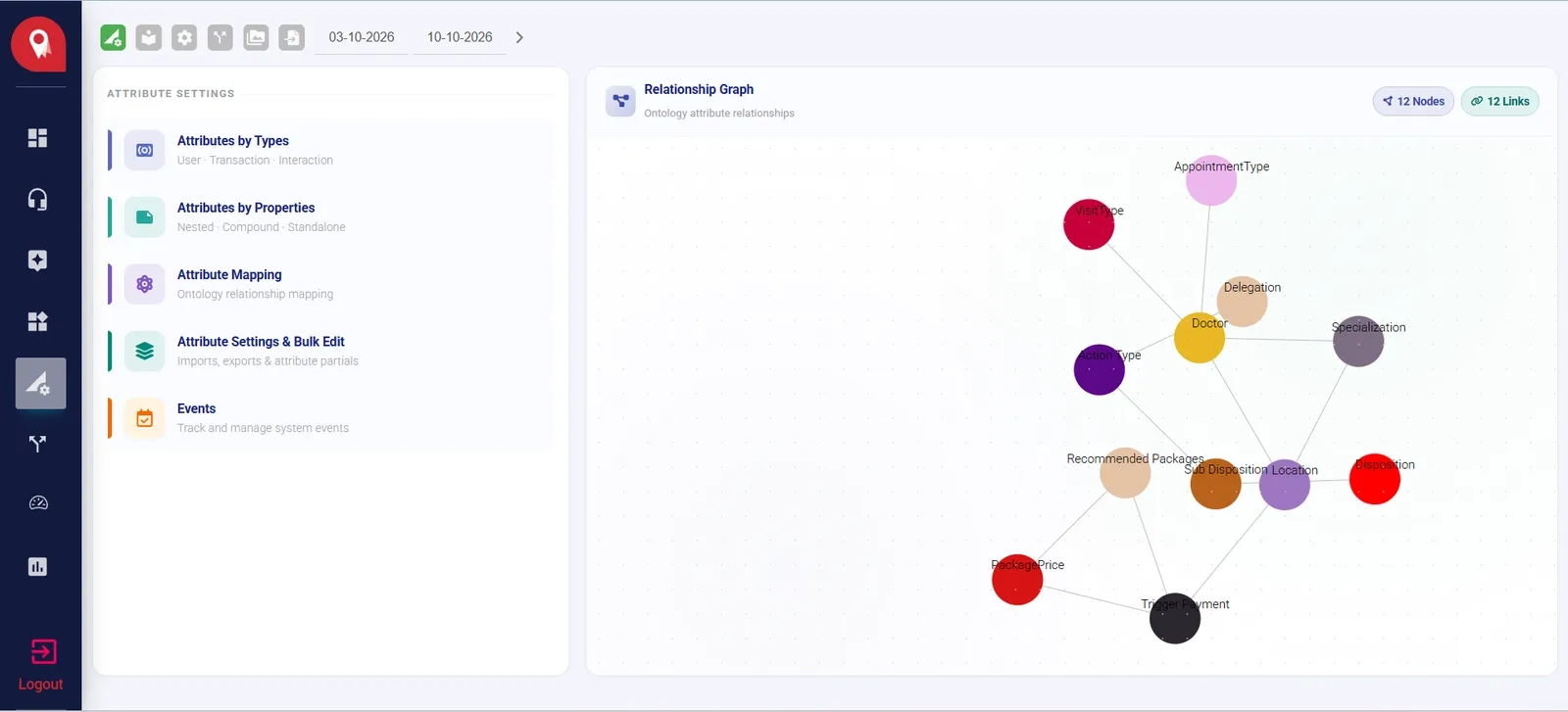
An ontology that gives every agent the same picture of your business
Bot swarm
Agents that each own one job: book, pay, read, update
Episodic engagements
Episodes that keep every visit, cart and family member in one place
Omnichannel CX Omnichannel CX that keeps one thread across every channel
NeuronCx keeps one record for every customer and runs each booking, order or enrolment as an episode, from the first enquiry to the next visit. Virtual agents take the routine steps, your team takes the judgement calls, and both work from the same record.
Why sales CRMs fall short
Built for customers who come back, not deals that close
Most CRMs were designed for sales teams moving a few large deals through a pipeline. A B2C CRM has a different job: thousands of people, each on their own journey, who come back again and again.
The follow-up that looks like a stranger A past customer gets in touch again and is logged as a new lead, so they explain everything from the start.
The customer who quietly drops off Someone stops halfway through a booking or order, and nobody notices because the pipeline only watches new leads.
One customer, many records The same person reaches you by phone, on WhatsApp and at two branches, and ends up as four separate entries.
records unlinked · history lost between visits
records unlinked · history lost between visits one customer record
One transaction, many carts
Every opportunity lives in its own cart, with its own stage, owner and payment. One continuous transaction holds the carts together, so the second booking, the add-on order and next year's renewal all land on the record they belong to. Pipeline CRMs start a fresh row for each new opportunity. The history still exists, but someone has to go looking for it, and usually nobody does.
One transaction, many people
A customer record that stops at one person loses the attendant who booked, the parent who pays and the dependent the service was for. All three are part of the same transaction, so all three sit inside it. Each person also keeps a record of their own, so whoever gets in touch next, your team sees the whole picture.
Hover or select a role to see where it sits.
Product in action
From first enquiry to paid booking, inside NeuronCx
Six screens your team works in every day: the Document workspace, the Cart, the transaction list with its interaction tray, AI workflows, SLA standards, and CX KPIs as they happen.
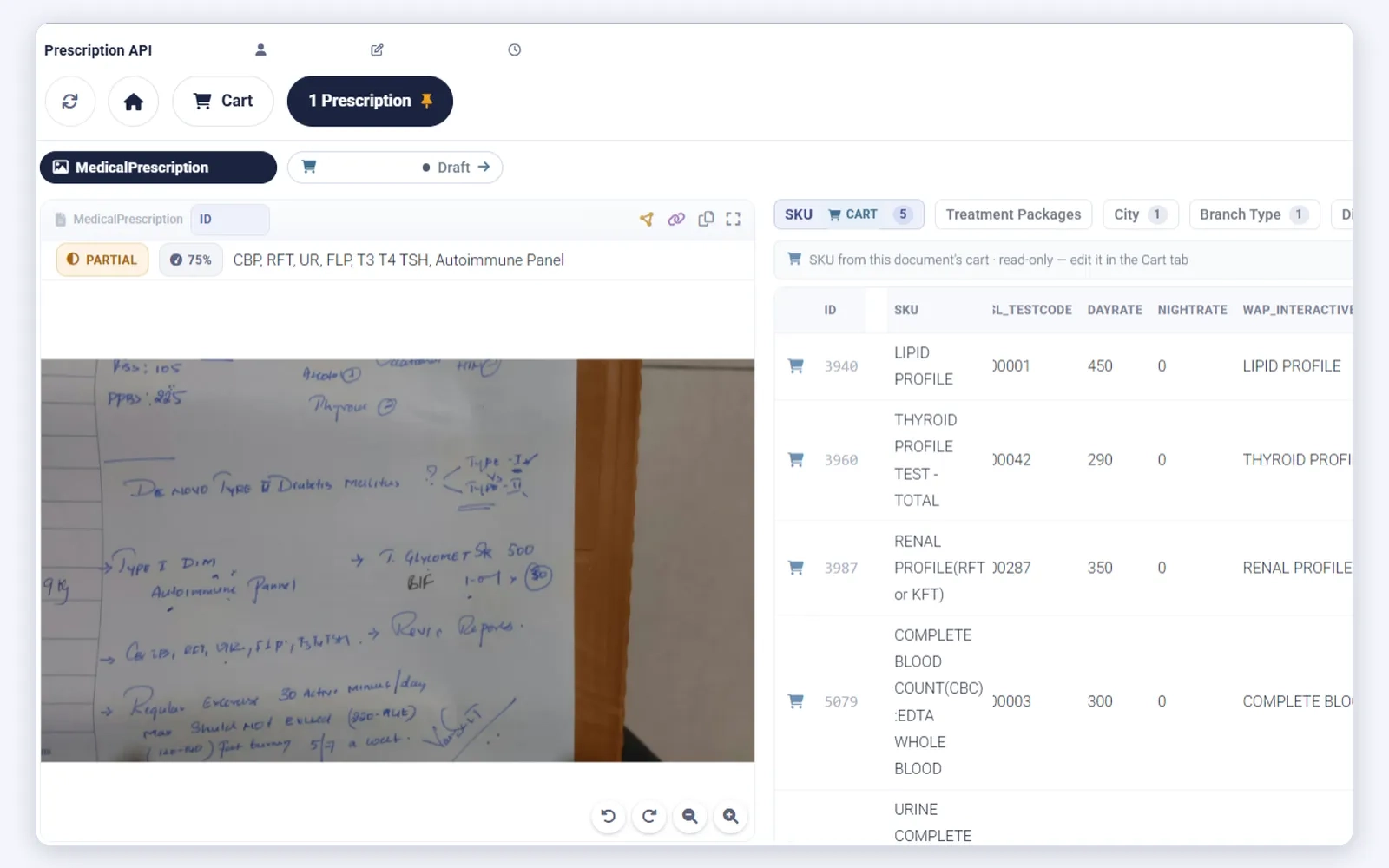
Document workspace: any document, read and priced as a cart
A customer sends a photo of a document, like an order list, a form or a prescription. NeuronCx reads each item, matches it to your SKU list with its price, and builds a draft cart. A partial read shows its confidence, so your team checks it first.
- Every item matched to an SKU, with its price
- Each reading marked complete or partial, with a confidence score
- Your team checks the list before the details go out
Document workspace · a document read at 75% and mapped to five SKUs
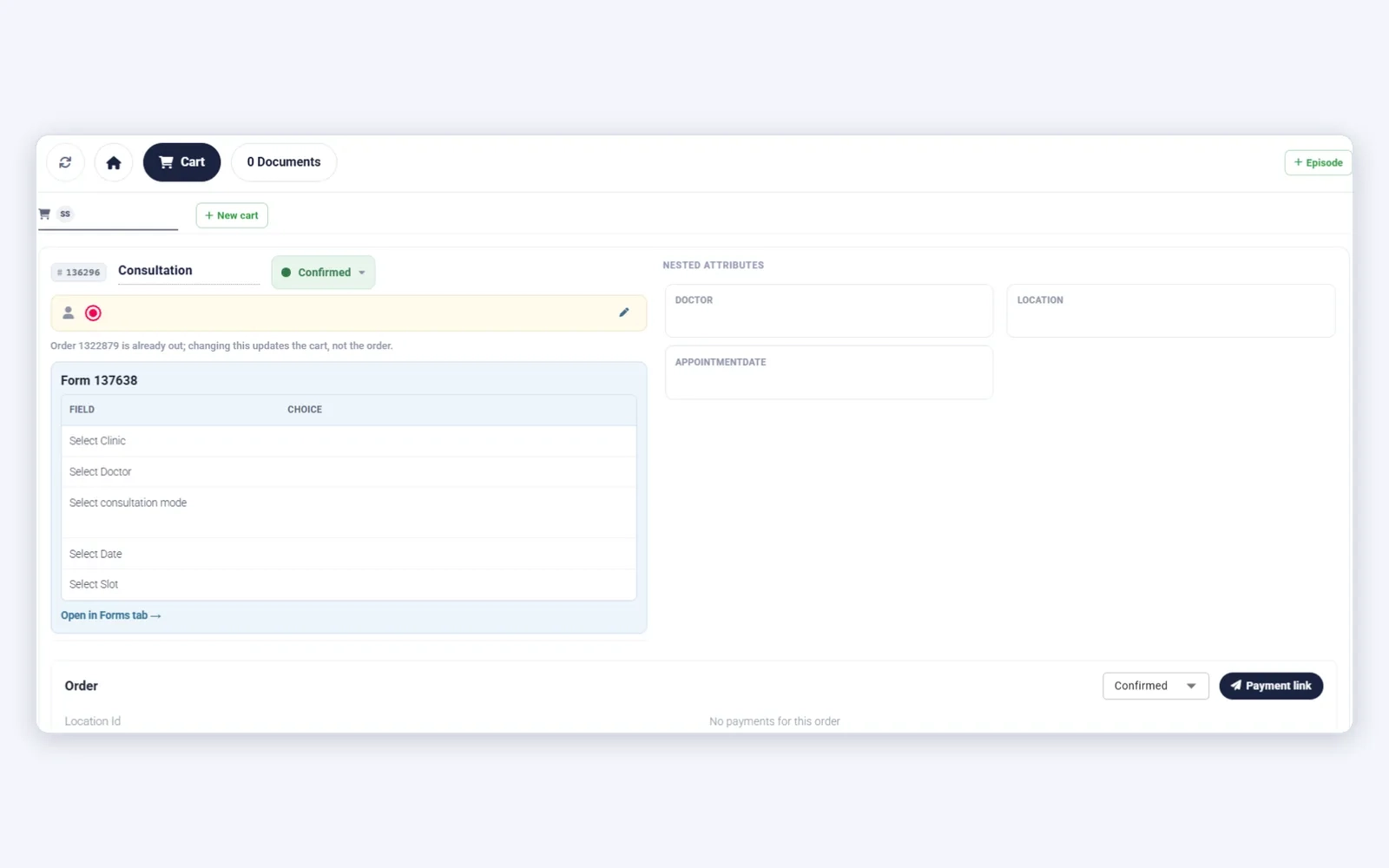
Cart: booking confirmed, order out, payment link ready
A booking from a partner channel arrives with its form answers already filled in. The cart is confirmed, the order is out, and the payment link goes to the customer from the same screen.
- Form answers and nested attributes kept beside the cart
- The order and its payment status in one view
- Add the booking to an episode with one click
Cart · a partner booking, confirmed and ready for payment
Transaction list with interaction tray: every lead, every touch
Leads from WhatsApp, calls and partner sources land as transactions in one list. The interaction tray on each row shows the calls, missed calls, forms, carts and payments so far, beside the stage and phase reached.
- Filter by source, phase, stage, orders, forms, attributes and flags
- Inbound and outbound calls, missed calls and flags at a glance
- Phases run from Enquiry to Appointment Booked to Billed
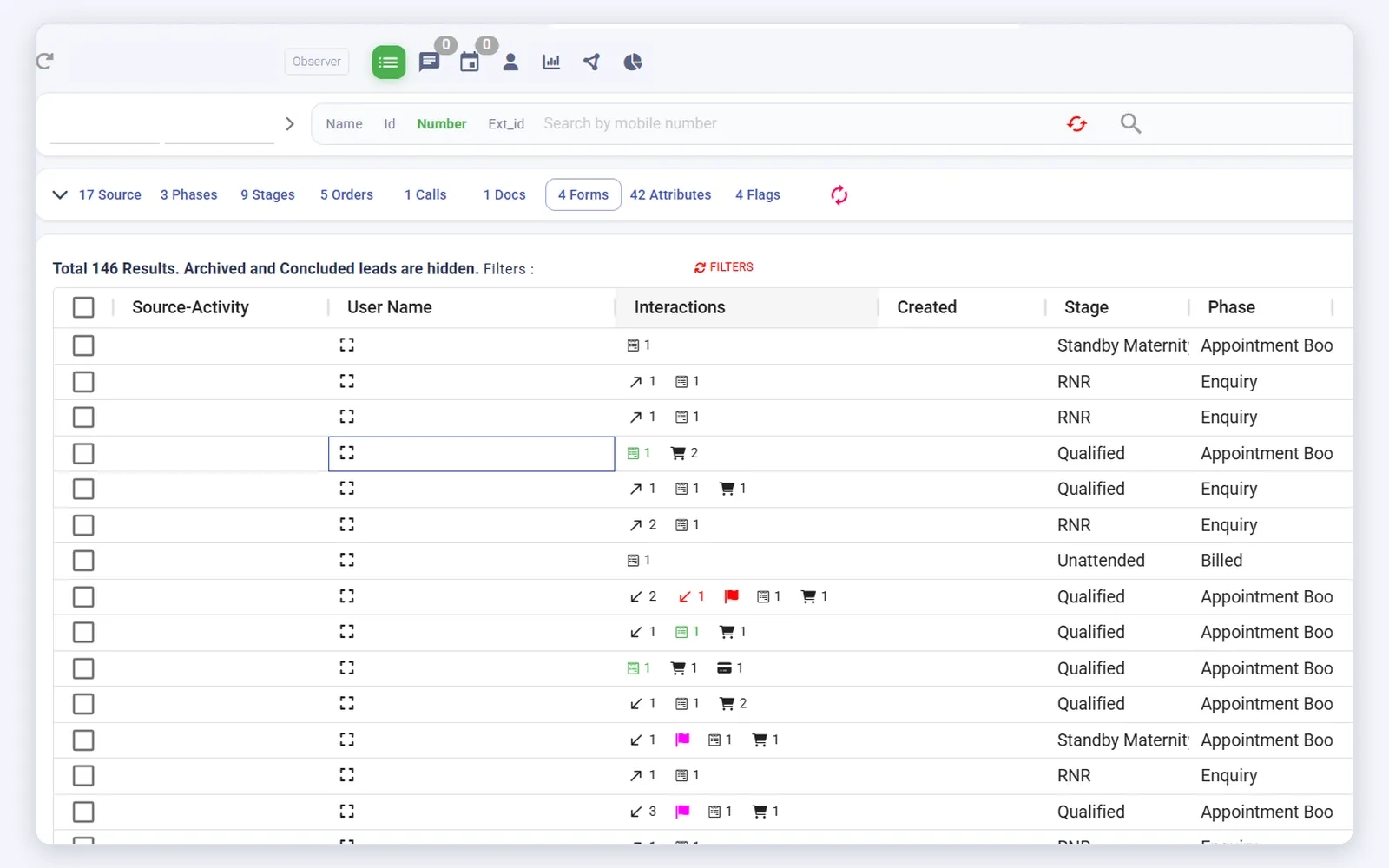
Transaction list · the interaction tray on every row
Workflow: every reply runs on a workflow behind the scenes
When a customer messages on WhatsApp, a workflow takes over. It gathers context from your Knowledge base, ontology, customer history and functions, generates the answer, and sends the reply with the right template.
- Built from reusable blocks: trigger, retrieval, AI agent and action
- Answers come only from your own sources
- Anything unsure is handed over to your team
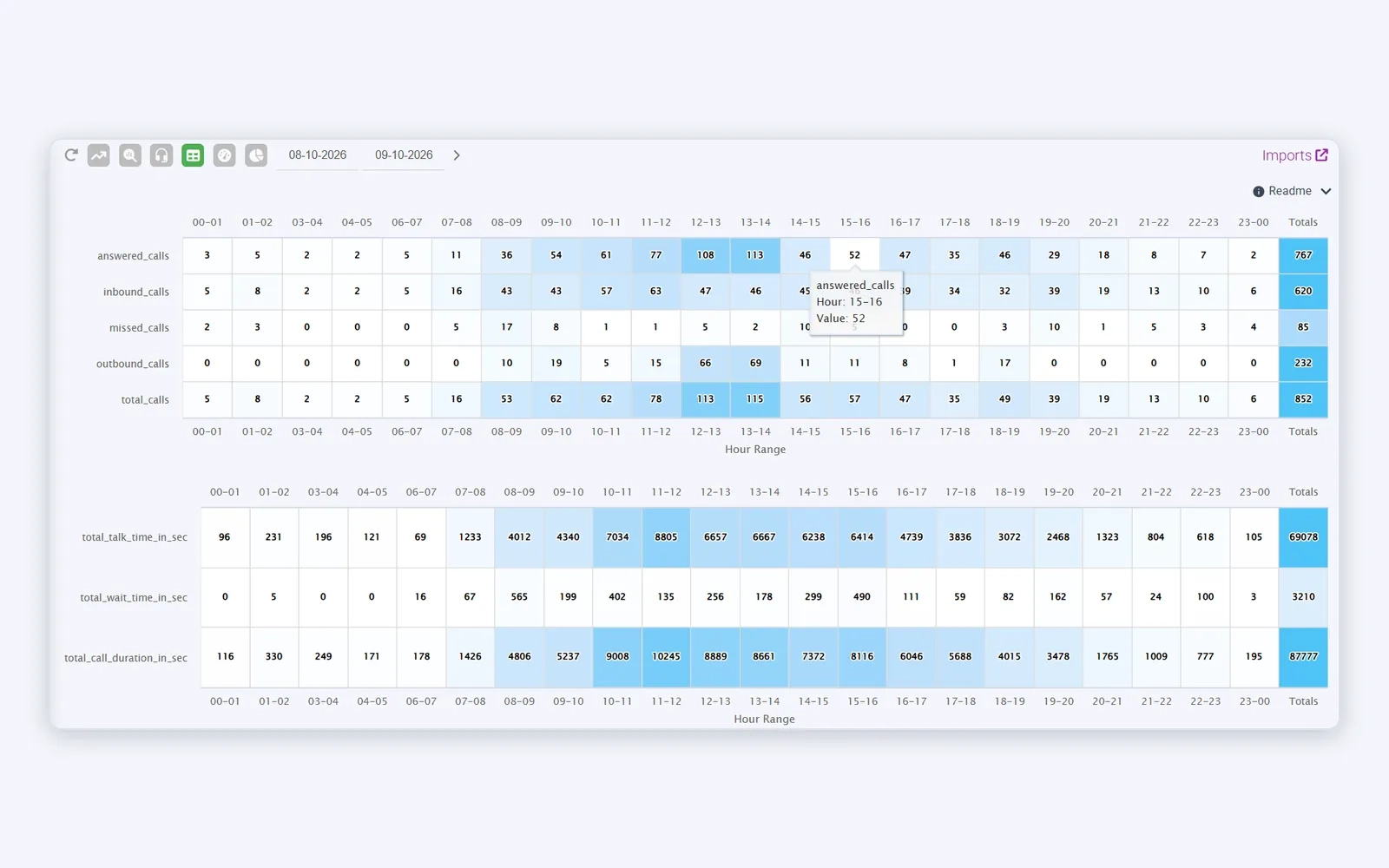
Workflow · the chat in front, the workflow behind it
SLA: every agent measured against your thresholds
The CX Ops Console tracks three SLA standards: Outbound Lead Response Time, Call Assessment Quality and Customer Effort Score. Each shows your threshold, the number of violations and the share within it, so a breach stands out straight away.
- Average lead response time for every agent
- Agents over the threshold shown in red
- Customer Effort Score counts the contacts before each booking
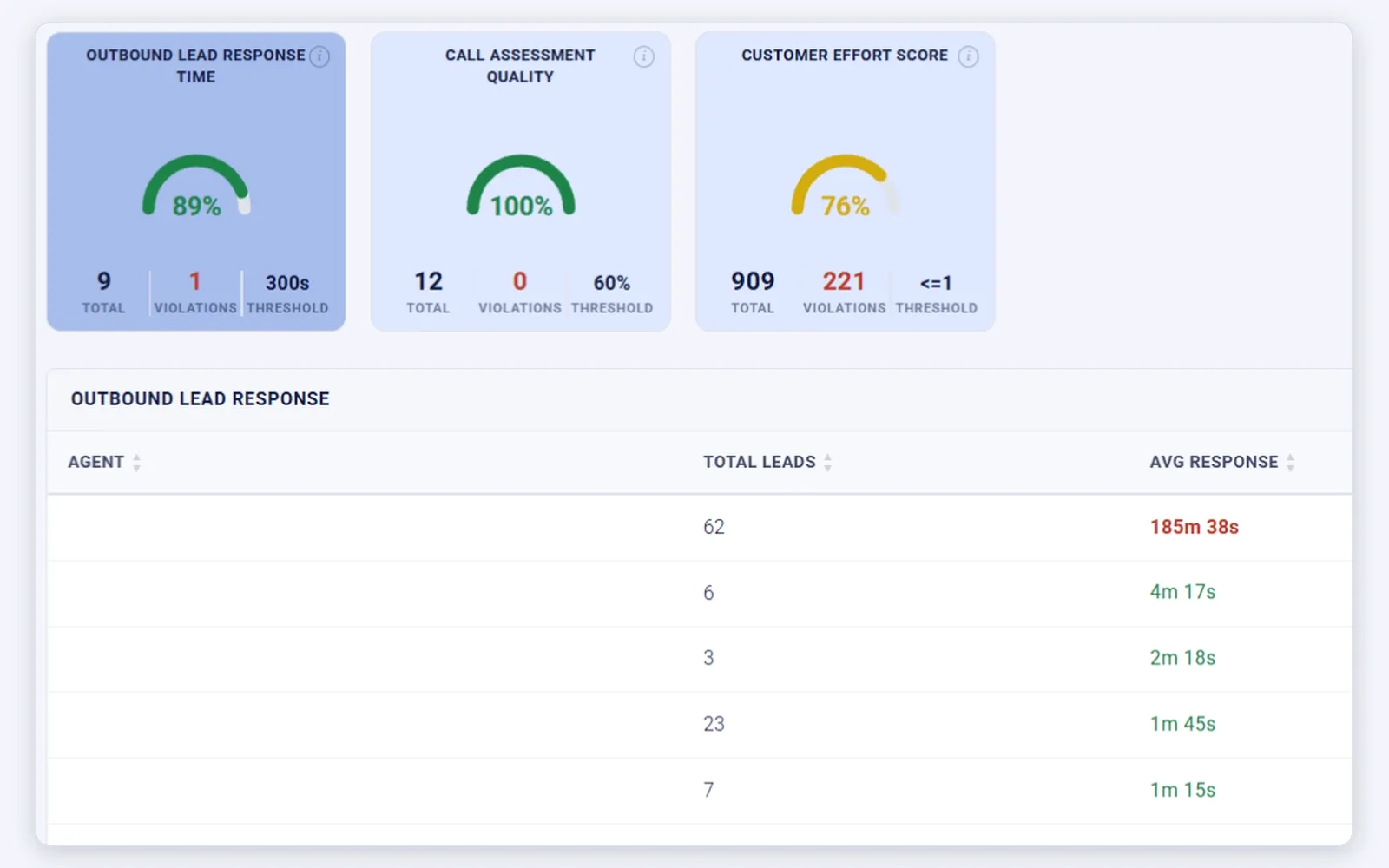
SLA · three standards, with violations against each threshold
Episodes that run for weeks or months, not one sale
Episodes that run for weeks or months, not one sale
Everything that happens along the way lands on the episode: messages, calls, carts, payments, forms and documents. When it closes, the outcome carries into the next one, so a returning customer is never treated as a stranger.
Source, channel and first questions are recorded, and an owner is assigned.
The cart is confirmed, the payment link goes out, and the key date is set.
Reminders and preparation notes go out on the schedule in the episode plan.
The visit, delivery or check-in happens. Attendance and any changes are recorded.
Results, feedback or next steps go out, and anyone who drops off is flagged to your team.
Agents handle the routine steps along the bar. Your team steps in wherever a judgement call is needed.
CRM workflow automation that finishes the job, not just the first step
Most CRM workflow automation waits for a trigger you set up in advance, then follows a fixed branch. Anything outside the branch waits for someone to notice. NeuronCx works from a shared model of your business: your services, prices, rules, locations and each customer's history. When something happens, it decides who should handle it and carries the job through to a finished action, recorded on the transaction it belongs to.
Pick an event and watch it travel through.
Illustrative run, not live data.
The platform
An AI-native CRM platform in four layers
The record comes first. Every channel writes to it, every agent works from it, and every result is measured against it.
- 01
Record: know every customer
Customer 360, transactions, carts and episodes across every location. One record per person, however they reach you.
- 02
Reach: the right message at the right point
WhatsApp, voice, web and campaigns, each writing to the episode it belongs to. Segments and consent decide who hears what, and when.
- 03
Run: agents that work from the record
Specialist agents and workflows that book, remind, take payment and follow up, with a handover to your team whenever a person is needed.
- 04
Measure: see what each episode earned
Every call scored, every SLA tracked, and every episode traced from the first message to revenue.
See how one record runs every episode
Book a demoFrequently asked questions
What is an agentic CRM?
An agentic CRM does the work as well as recording it. In NeuronCx, specialist agents book, remind, take payments, read documents and follow up, working from the same customer record as your team. When an agent can't finish a job, it hands over to a person with the full history attached.
How is an episodic CRM different from a sales CRM?
A sales CRM follows a deal through a pipeline until it closes. An episodic CRM follows the customer through each booking, order, stay or enrolment, from the first message to the follow-up, and carries the outcome into the next one. Returning customers are recognised instead of being logged as new leads.
Can one customer have several bookings or orders open at once?
Yes. Each booking or order sits in its own cart, with its own stage, owner and payment status. All the carts belong to one transaction, so your team sees everything open for that customer in one place, and nothing is lost when one cart closes.
Can family members or attendants sit on the same transaction?
Yes. Dependents, attendants, parents, spouses and any roles you define can all be added to one transaction. Each person also keeps their own record, so reminders and payment links reach the right person, and their history follows them into future episodes.
Inside the agentic CRM
One agentic CRM, from the first message to the closed episode
Most CRMs record what happened. NeuronCx runs the work. Channels, workflows and AI agents all read from one shared model of your business, so your team and your microbots act on the same context and the customer never has to repeat themselves.